The Support Queue Is Lying to You. Clustering Tells the Truth.
March 31, 2026 · 5 min read · Implementations
Your support queue is not a list of random problems.
It is a structured signal — but only if you look at it at scale. Most teams don't. They respond ticket by ticket, and the pattern underneath stays invisible.
We clustered thousands of support tickets using semantic embeddings and machine learning. What came back wasn't just a pie chart. It was a map of where our product actually breaks down for real users — and a roadmap for fixing it at the source.
The Pain Before Clustering
Support teams face a specific kind of exhaustion: answering the same questions, forever, with no mechanism to stop the loop.
Before clustering, our situation looked like this:
- The queue kept growing, but we couldn't say why — what was driving volume, what was seasonal, what was structural.
- The same categories of issues were handled manually, by different agents, with inconsistent quality.
- Product and documentation teams had no clear signal on what users were actually struggling with.
- New support agents learned by osmosis — they read random tickets, not patterns.
- AI agents were trained on generic prompts instead of real, recurring topic categories.
The core problem: without structure, you can't act at the system level. You can only react.
What Clustering Makes Visible
After clustering, you get something you didn't have before: a stable map of your users' actual problems.
Not a tag taxonomy you invented. Not categories from your ticketing system. The topics that emerge from what users actually write, grouped by semantic similarity.
That map unlocks decisions you couldn't make before.
1. You know what to automate — and how
This is the most direct ROI.
Cluster topics become training buckets for AI support agents. Instead of one generic prompt trying to handle everything, you get topic-specific agents with targeted retrieval, focused context, and relevant examples.
The result: fewer escalations, higher first-response quality, lower load on human support staff. The clusters tell you where AI can take over — and exactly what it needs to know to do it well.
2. You see where your documentation is failing users
High-volume clusters around "how do I..." questions are a direct signal: users are not finding the answer on their own.
That's a documentation gap. Or an onboarding gap. Or both.
Clustering makes these gaps legible. You can rank documentation work by ticket volume. You can fix the five help articles that would deflect hundreds of tickets a month. That's a different conversation than "we should improve our docs."
3. You know where to train your support team
Not all clusters have the same resolution quality. Some topics are handled consistently. Others have high variance — different agents give different answers, or resolution takes much longer.
Those are your coaching priorities. Instead of generic training, you build topic-specific playbooks for the clusters where performance is weakest. Faster ramp-up for new agents. More consistent answers for users.
4. Product gets a ranked problem list
Cluster size × issue severity × business impact = a prioritization signal that's hard to argue with.
Instead of debating roadmap based on loudest stakeholders, product teams get a view of the most expensive friction points — measured in support volume and real user pain.
The Stack — and Why Each Choice Was Made
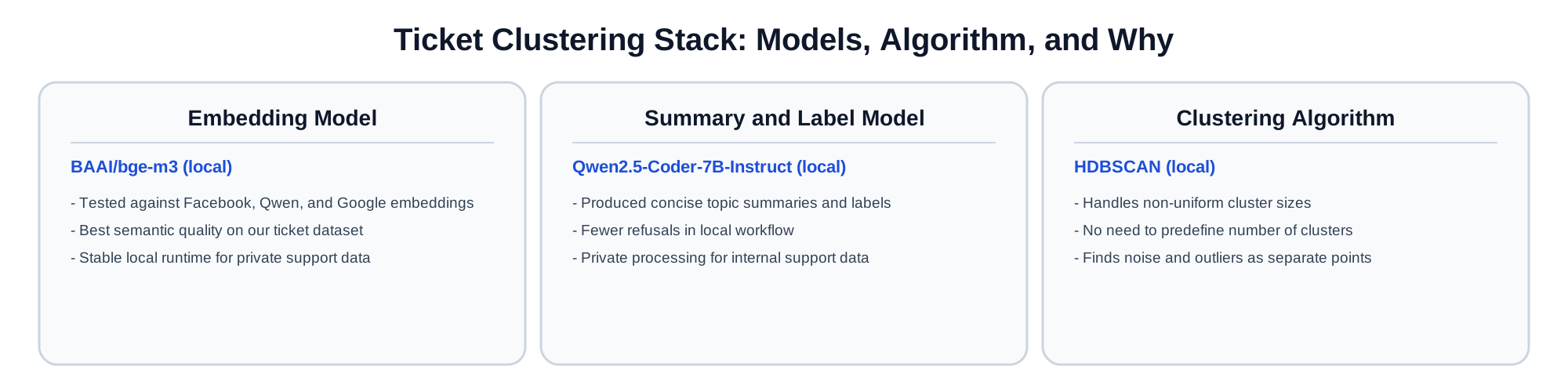
Embedding model: BAAI/bge-m3 (local)
Support tickets are messy. Short texts, typos, mixed language, domain jargon, partial sentences.
We tested multiple embedding families, including Facebook, Qwen, and Google options.
BAAI/bge-m3 performed best on our support dataset. It produces high-quality semantic vectors for short and noisy text, works across multilingual inputs, and sits at a practical quality-to-cost balance for production use. The embedding step runs locally, so semantic processing stays inside our environment.
Summary model: Qwen2.5-Coder-7B-Instruct (local)
After clustering, each group needs a human-readable label. We tested several models for generating concise cluster summaries.
Qwen2.5-Coder-7B-Instruct ran locally and produced fewer refusals in our workflow than alternatives — a real practical advantage when processing internal support data that can't go to external APIs. It generated tight, accurate topic labels that made cluster review fast and reliable.
Running locally also means the data stays internal. For support ticket data, that matters.
Clustering algorithm: HDBSCAN (local)
Real ticket distributions are not uniform. Some topics appear in thousands of tickets. Others are rare, specific, or incident-driven. K-Means can't handle this — it forces equal-size clusters and requires you to specify the number of clusters upfront, which you don't know.
HDBSCAN doesn't have these constraints:
- It finds clusters of any shape and size, reflecting the actual distribution in the data.
- You don't predefine the number of clusters — they emerge from the data.
- It explicitly identifies noise points and outliers, which is valuable for catching unusual incidents that don't fit any recurring topic.
For support data, HDBSCAN is the honest algorithm. It reports what's actually there, not what you asked it to find. The clustering step also runs locally.
What Changed After Clustering
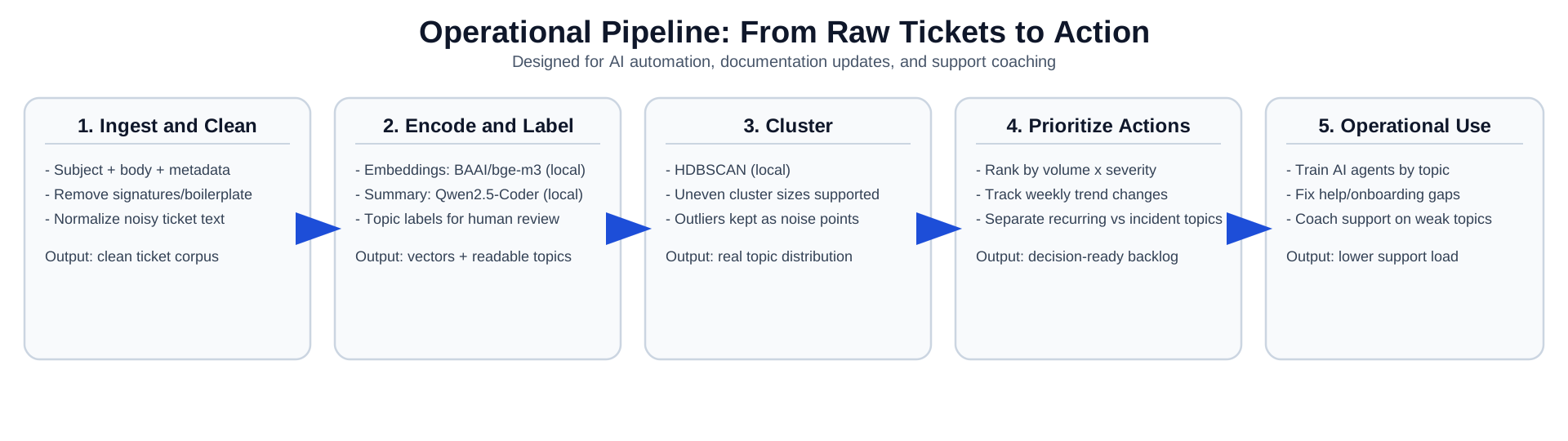
The shift wasn't just analytical. It changed how we operate:
- AI agents were trained on real cluster topics, with targeted context per topic instead of one generic prompt.
- Documentation updates were prioritized by top recurring clusters — not by gut feel.
- Support coaching focused on the clusters with the weakest resolution consistency.
- Weekly review moved from random ticket sampling to topic trend analysis — watching which clusters grow, shrink, or spike.
The operational mode changed: from reacting to isolated tickets, to managing a system of recurring issues.
The Bigger Point
Support tickets are the most direct signal you have about where your product and documentation are failing real users. Most teams let that signal sit unread in a queue.
Clustering reads it.
It connects three layers that usually operate in silos — daily support execution, AI automation quality, and product/documentation improvement — into one shared map of user pain.
If your queue is growing and you don't know why, clustering is the fastest way to find out.
Have you tried clustering your support tickets? I'd be glad to hear what worked and what didn't.